2025
2025-12-04: Sales Mobile
We are excited to announce the launch of mobile browser access for the Pluto Sales App! You can now access key features and functionality directly from your phone for on-the-go productivity.
This initial mobile release serves as a powerful subset of the full desktop application, making existing features accessible on your phone. No net new functionality has been introduced to the core Sales App platform with this release. The focus is on essential viewing and creation tools.
🚀 How to Access
The Sales App is fully accessible via any mobile web browser.
✨ Key Features Available on Mobile
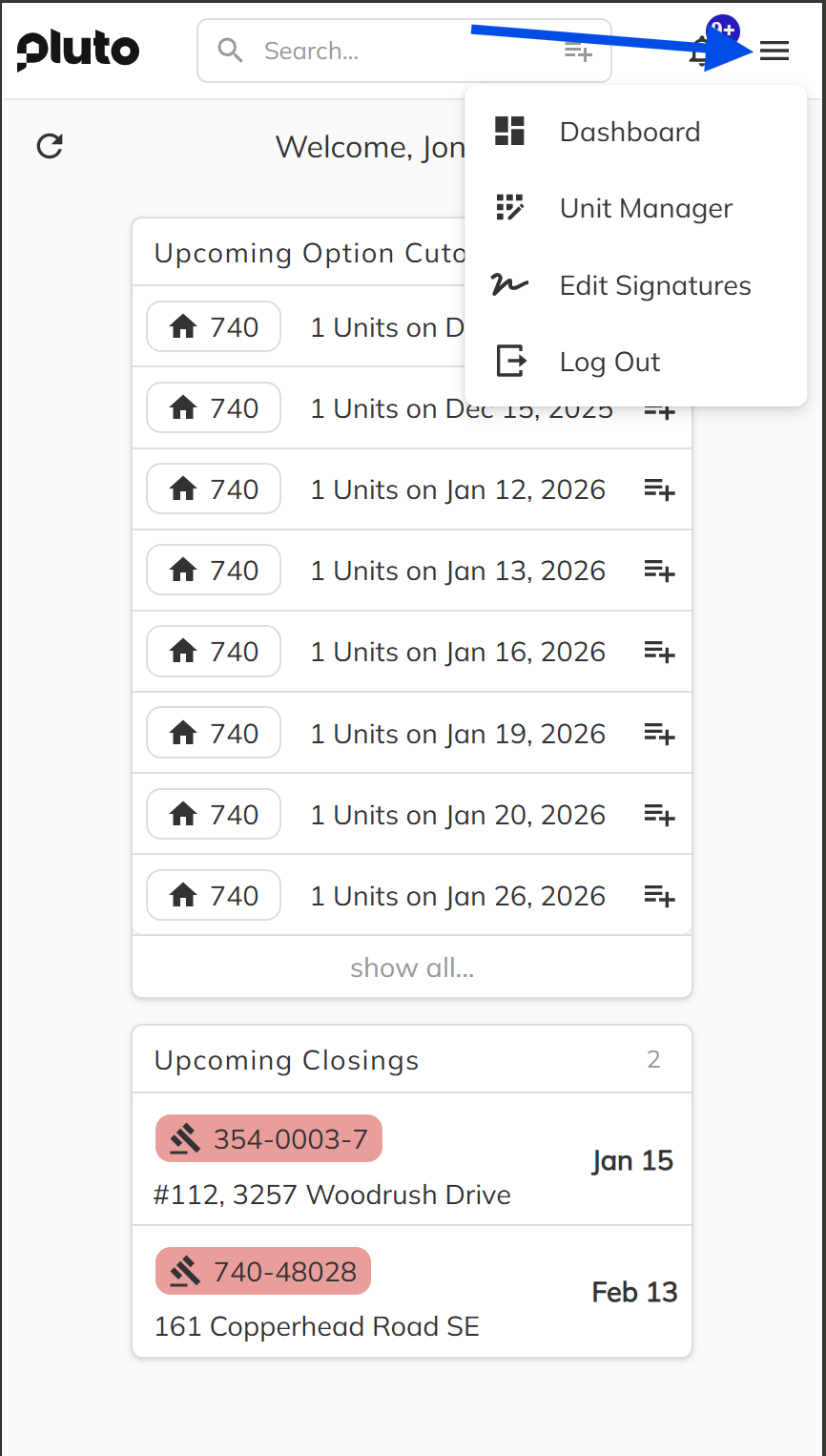
Intuitive Navigation
A new main navigation dropdown menu has been implemented to simplify movement across the application on smaller screens, making navigation fast and efficient.
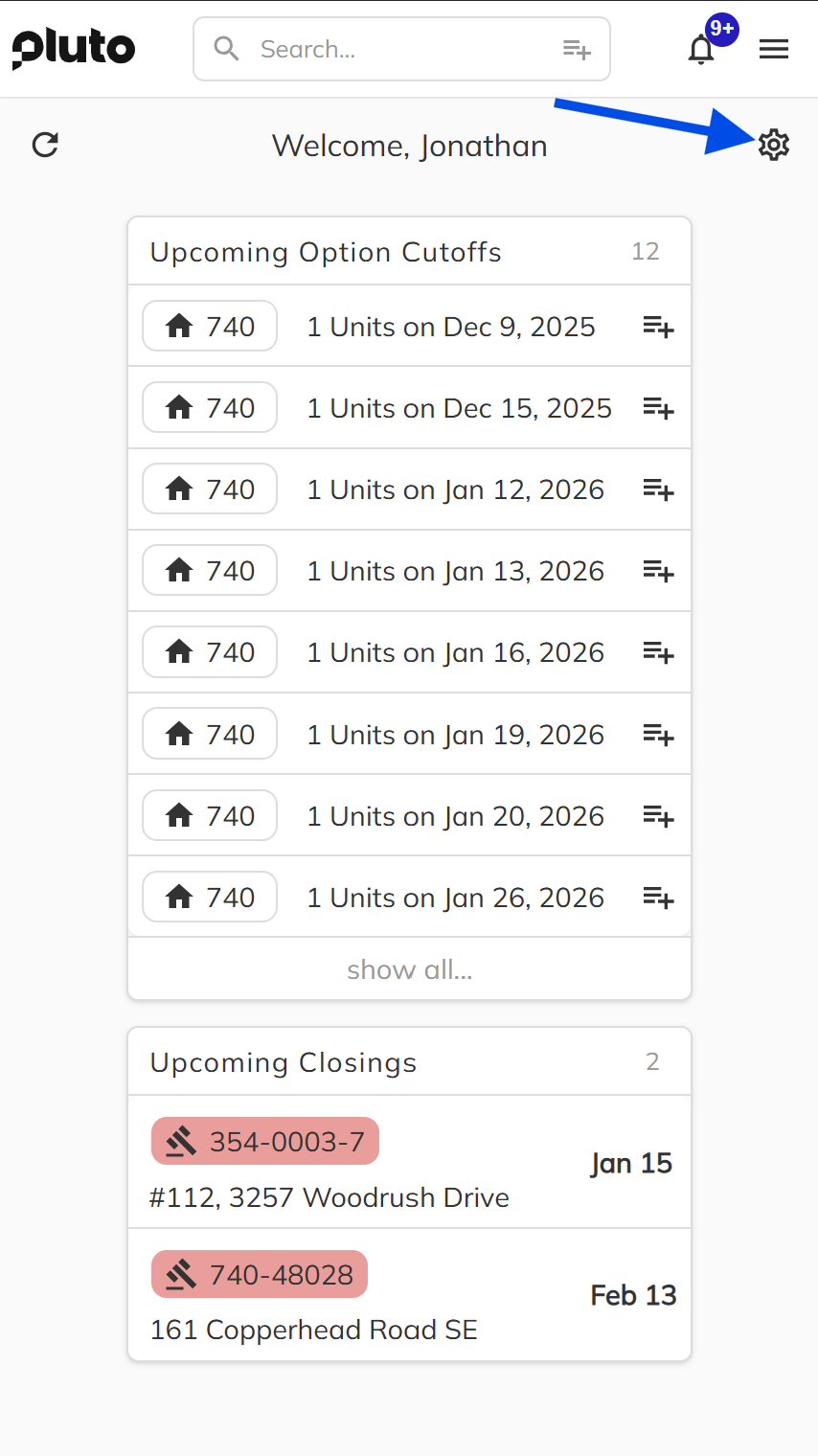
Personalized Dashboard
The dashboard now features a completely customizable experience. Start with a blank state and tailor your interface by adding, organizing, and moving information cards.
Unit Manager
-
Supports advanced filtering to quickly locate units.
-
Users with appropriate permissions can edit unit prices and availability.

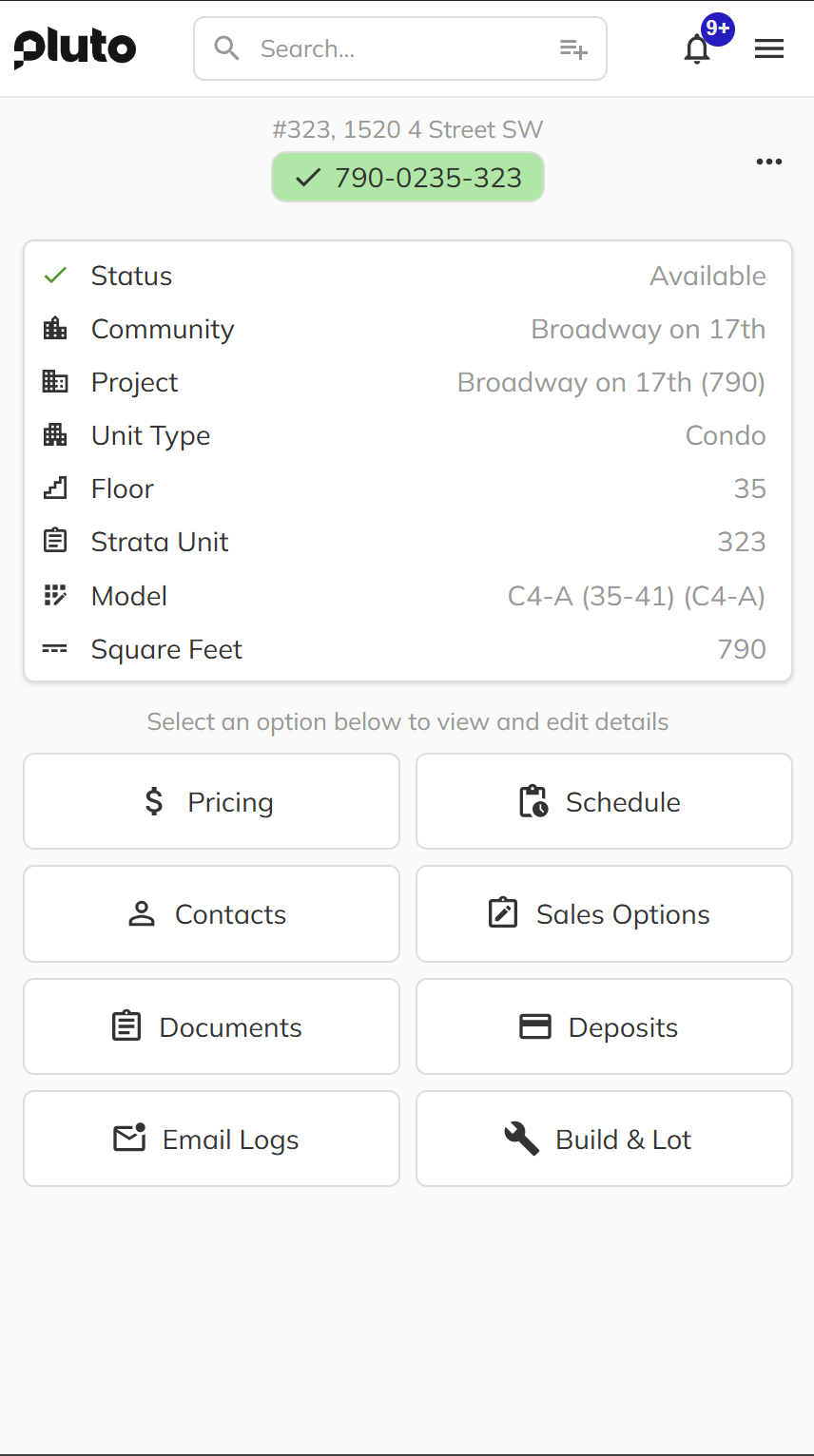
Comprehensive Unit View
The dedicated Unit View page provides a holistic view of all project details, including:
-
Pricing details
-
Schedule
-
Contacts (Realtors, Purchasers, Lawyers)
-
Standard Sales Options
-
Documents
-
Deposit information
-
Email logs
-
Build & Lot information
Content Creation
-
You can now create and manage several key artifacts directly within the app:
-
New emails and correspondence.
-
New contacts (Realtors, Purchasers, Lawyers).
-
Record new deposits.
-
Generate new Standard Sales Options and Documents.
Document Handling
-
Document Sharing: Share documents directly from your device.
-
Developer Signing: Users designated as Developers are now able to digitally sign documents within the app.
🚫 Known Limitations in Mobile Access
Please note that the following functionalities are currently not supported in the initial mobile web release and should be performed on the desktop version:
-
Deal Writing
-
Client Signing on the device
-
Deposit Slip Generation
-
Custom Options Management
-
Administrator Tasks
2025-10-15: Workbench
Overview
This release brings significant improvements to the Workbench, focusing on enhanced usability, better project management, and improved handling of parking and storage facilities. These updates streamline the process of managing large-scale construction projects and improve the overall user experience.
Release Highlights
-
Project Staff Management
- Simplified contact management removed Contact types that were not needed
- Introduced a new division management interface in the admin section for enhanced control
- Implemented improved permission handling when managing staff division assignments
-
Parking and Storage Management
- Optimized bulk operations for efficient management of parking stalls and storage units
- Enhanced error handling with clear messaging for duplicate parking stall numbers
- Unified terminology across the platform for consistency (replaced "Visible" with "Public")
- Added support for bulk assignments and deletions with partial unit allocation
-
Unit Management
- Enhanced system performance for large-scale unit creation (50+ units)
- Improved address override system with clearer display and management
- Fixed fee simple unit creation process with existing lot integration
- Refined list price display to properly show decimal values
- Added detailed tooltips explaining gross and net square footage measurements
-
User Interface Enhancements
- Added convenient navigation with Ctrl + click support for Unit and Workbench views
- Improved notification system for internal system messaging
Conclusion
These Workbench updates deliver significant improvements in efficiency and usability, particularly beneficial for large-scale project management. The enhanced error handling, unified terminology, and intuitive management tools provide a more streamlined experience for construction project teams.
2025-09-23: Unit Model Override
Overview
This release introduces the Unit Model Override feature to the Pluto Sales App, designed to provide greater flexibility and accuracy in unit-level data management. The goal is to allow housing developer teams to record permanent, physical differences for individual units, ensuring that all sales, documentation, and reporting reflect the true specifications of each home.
Release Highlights
- Unit Model Overrides let you adjust specific numeric and area attributes for individual units, diverging from the base Unit Model only when necessary.
- Override Mode in the Units screen provides a clear interface for editing and tracking overrides, with status icons for easy identification.
- Floor Plan File Override allows a unit to display a custom floor plan file, replacing the model’s shared version wherever it appears.
- Automatic Updates: Overridden values and files are reflected throughout the platform, including summaries, documents, and portals, with no extra steps required.
- Opt-In Principle: Only meaningful, permanent differences are recorded. Identical values are not treated as overrides, keeping data clean and accurate.
- Reference: For full details, see Unit Model Overrides.
Conclusion
The Unit Model Override feature streamlines the process of managing unit-level differences, ensuring that all data and documents accurately reflect the physical reality of each home. This enhancement supports operational efficiency and data integrity for all Pluto Sales App users.